
FAQ
Click HERE for product setup instructions. You can also ask SwishBot at the lower right corner of this page.
How does the Swish Hoop® Shot Monitor work?
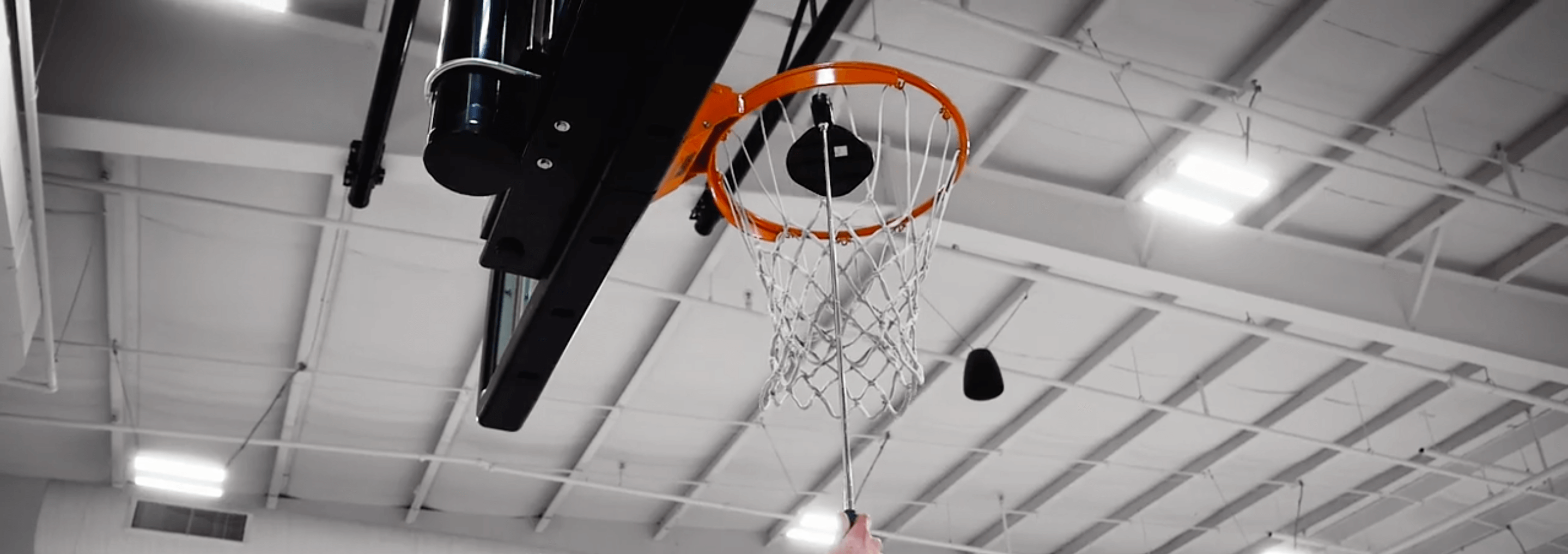
The Swish Hoop® Shot Monitor tracks your made shots, missed shots and swishes through a simple, paddle-shaped sensor that you hang on the net of a basketball goal (see here for the video).
Your misses are detected through a very sensitive vibration sensor within the Shot Monitor. It is so sensitive, that it can detect vibrations from a ball impact against a backboard as the vibrations pass through the backboard, through the rim, through the net and into the Shot Monitor. Your makes are detected by either a changed angle of the Shot Monitor when it tilts down from the ball passing over it, or from a sideways acceleration when the ball comes through the net at a shallow angle. Your swishes are detected when either a make occurs without a prior vibration, or if the time between a detected vibration and the make sensor trigger is exceptionally quick. Your tracked shot measurements are then wirelessly sent to your mobile device that is running the Swish Hoop® Player App, which then stores the results to the Swish Hoop®cloud so you can view your stats later.
Do I have to wear anything?
No. TheSwish Hoop® Shot Monitor is designed to detect shot makes, misses and swishes without you having to wear anything on your body.
The Shot Monitor is a simple sensor that can easily be attached to and hung from the net.
How do I charge the Shot Monitor?
No charging of the Swish Hoop® Shot Monitor is necessary. There is an internal battery that is permanently sealed inside the waterproof enclosure. Depending on the frequency that the Shot Monitor is used, the battery should last four to six years. Battery replacement is only possible by the factory.
Contact Swish Hoop® here directly for a replacement unit should your internal battery wear out.
How accurate is the Shot Monitor?
When properly set up, the Swish Hoop® Shot Monitor should measure your makes and misses at an accuracy greater than 99.9% when shooting from in front of the hoop. That means it should make no more than one make/miss measurement error every 1,000 shots. Its accuracy in determining whether a make was a swish (nothing but net) or not is significantly lower than this.
Do I need a ladder to attach the Shot Monitor to the net? How do I attach it?
No, you don't need a ladder. The Swish Hoop® Shot Monitor can be attached to the net by almost anyone from the ground. It comes with a simple-to-use Swish-STIC, which is a telescoping magnet that opens a latch on the Shot Monitor, allowing it to be locked onto the net far above your head. Watch the video or see here for instructions to attach the Shot Monitor to a net.
Can I use the Shot Monitor outdoors?
Yes, you can. The Swish Hoop® Shot Monitor is certified IP66 compliant, which means it is dust and water resistant.Please do not expose it to heavy downpours or icy conditions.
Can I use the Shot Monitor on any net?
Yes, you can. The Swish Hoop® Shot Monitor will work on any string net (not compatible with chain nets). Some nets (best are anti-whip, tight nets) may work better than others (avoid old, loose nets).
What is the Shot Monitor made of and what is inside?
The Swish Hoop® Shot Monitor is made from Sturdyflex: a special Swish Hoop®formulation that makes it nearly unbreakable. The Shot Monitor paddle is designed to be resilient, easy for you to insert and remove and shaped to catch the greatest number of makes possible.
Inside is a sophisticated miniature computer that can communicate with your phone over a wireless connection. Very sensitive sensors can feel any vibrations through the net generated from a ball hitting the rim or backboard (for misses), kind of like a spider can feel vibrations anywhere on its web. The sensors also detect any interactions with the ball as it passes through the net (for makes and swishes).
How do I get the Swish Hoop® Player App?
The Swish Hoop® Player App is free and you can download it from your iOS or Android App Stores. See here for instructions on how to download the app and here if you have related Player App questions.
I am not getting the shooting results accuracy I expected from the Shot Monitor sensor. How do I improve that?
The Swish Hoop® Shot Monitor should produce extremely accurate shot measurement results; however, there are two main causes for lower accuracy: the type of net and rim stability. For the best results, the net attached to the rim should be a high quality net that is stiff and tight. If a net is too wide (loose) then it may be possible for a ball that passes through the rim to bypass the Shot Monitor by passing around the side of the paddle.
This may be remedied by either replacing the net with a better quality, tighter one (for example, anti-whip nets similar to this one) or by adding a net cincher (contact Swish Hoop here directly for cincher information) to the loose net (see here for cincher installation).
If the Shot Monitor is attached to a basketball goal (rim, backboard, pole, etc.) that is not extremely physically stable, but can vibrate excessively from contacts with the ball during shooting, some reduced accuracy of the Shot Monitor is possible. After a shot is tracked, the Shot Monitor waits for a short time before enabling the sensors to detect the next shot. In a stable goal system, this dwell period allows the Shot Monitor to come to rest.
In a less stable system, the goal system may continue to vibrate beyond the dwell period, which can result in the Shot Monitor registering an additional shot attempt (miss). This type of error may be reduced by changing the setting for the Shot Monitor from SHORT DWELL to HIGH DWELL. To do this, follow the following steps: 1) Go to the Settings on the Swish Hoop® Player App on your mobile device
2) Choose the Preferences option
3) Within Preferences, choose DWELL and set that to HIGH. (NOTE: This feature is not yet available in the Player App).
Why do I have to sometimes wait between shots?
The Swish Hoop® Shot Monitor tracks makes by the ball striking the paddle as it passes through the net and tracks misses through its vibration sensor detecting ball interactions with the backboard or rim. In order to detect a make, where the ball bounces on the rim several times before dropping through or if a ball circulates around the rim before dropping through, the Shot Monitor needs to wait about 1.5 seconds after a vibration is first detected to see if the ball drops through. This means that any additional shot that comes within this period will likely not be counted as a second shot, but part of the first shot.
How do I connect my phone or tablet to the Shot Monitor?
To activate the Shot Monitor device for wireless connection, tilt the paddle downward. When it is ready to connect, the small green light on the bottom of the Shot Monitor will show a double blink every few seconds. Wireless connection is initiated within the Swish Hoop® Player App on your mobile device. This app must first be installed on your device.
Open the app and go to Settings > Devices and look under the Swish Hoop® Shot Monitor heading for devices. You should see your Shot Monitor device listed. If not, tap the “GO” button in the Player App and re-tilt the device. If you still see no devices listed, read the FAQ below. Tap the circle on the right of the listed device to connect. The circle will turn green when the connection is completed.
See the instructions for greater detail with photos and videos and here if you have related Player App questions.
I cannot connect to my Shot Monitor. What is wrong?
Swish Hoop® Shot Monitors are shipped from the factory in a “locked” state. If you have not yet unlocked your Shot Monitor, this needs to be done, but it only needs to be done once and never again.
If you are not sure if your Shot Monitor is unlocked, tilt the paddle end down and see if the green light on the bottom shows a double blink every 5 seconds. If it does this for a while, then it is unlocked. If not, you will need to unlock the Shot Monitor so it may be connected: follow the instructions here.
You can get more insight by seeing what the green light is doing:
- A regular double blink means it is trying to connect to something. 🟢🟢......🟢🟢......🟢🟢......🟢🟢
- A regular single blink means it is already connected to something. 🟢......🟢......🟢......🟢
- An irregular single blink means it is not yet unlocked.🟢..........🟢...🟢................🟢...............................🟢
If your Swish Hoop® Shot Monitor is unlocked and showing the double blink, but you still can't connect, make sure your phone or tablet has Bluetooth (version 4.0 or later, also called BLE or Bluetooth Smart) capability and it is turned on. Turning on this functionality is typically done under the settings screen on your device.
Bluetooth should be enabled (turned “on”). If the Bluetooth on your device is “on” and the Shot Monitor is showing a double blink every five seconds, then follow Step 3 of the instructions here to connect your mobile device to the Shot Monitor. Devices compatible with the Shot Monitor include:
- iPhone 4S and later (note iPhone 4 and earlier iPhones do not have the right version of Bluetooth hardware)
- iPod Touch 5th Generation and later
- iPad 4th Generation or later
- Android devices with Bluetooth 4.0 or later
Why doesn't the Swish-STIC open the Shot Monitor latch completely?
The Shot Monitor secures itself to the net by trapping two net strings into two grooves at the top, then locking them into the grooves using the latch forks. The latch is automatically opened with the Swish-STIC magnet is attached to the shot monitor. Excessive friction between the magnet cone and the bottom of the latch can produce a partially opened state. This is easily remedied by spreading a couple of drops of cooking oil, liquid soap or other similar lubricant onto the tapered portion of the magnet cone. Only a very small amount is needed and this should only be required occasionally.